Login
Login
 Register
 Blog
Blog


YouTube Video Privileges - Help
On this page you can find the detailed description on how to set up your YouTube Video Privileges, so Everybody can View, Like and Comment on them.
Higher the number of YouTube Interactions = better overall YouTube rank.
Step 1. - Login To Your YouTube Account | |
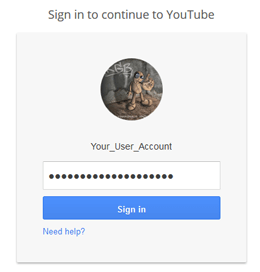 | Login To Your YouTube Account. |
Step 2. - Click On the "Profile Icon" Button | |
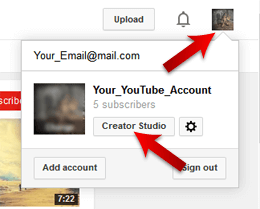 | On the upper right corner of the YouTube Page you will find the Profile Icon button. Click on the Profile Icon button and select the Creator Studio option. |
Step 3. - Click on the Video Manager Option | |
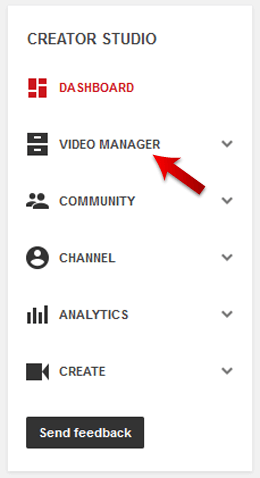 | New Page will open and click on the on the Video Manager and the new manue will apear. |
Step 4. - click on the Edit Button | |
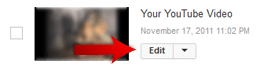 | New Page will open there you need to select the Video which privilages you want to modify and click on the Edit Button of that YouTube Video. |
Step 5. - Set the Video to Public View | |
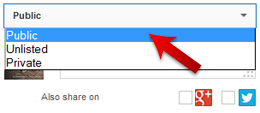 | Under the Basic Info section set the Video to be Public Viewd and click on the Blue "Save" button. |
Step 6. - Go to the Advanced Settings | |
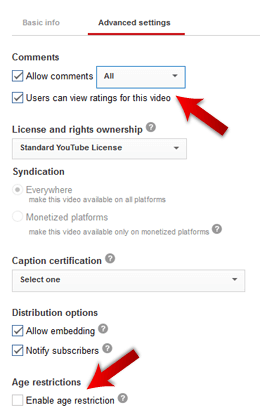 | Under the Advanced Settings in Comment section check the "Allow Comments" and set it to "All" and check the "Users can View ratings for this Video" check box. Under the Age restriction make sure that "Enable age Restriction" option is not selected. Click on the Blue "Save" button. |
Step 7. - Video Statistics | |
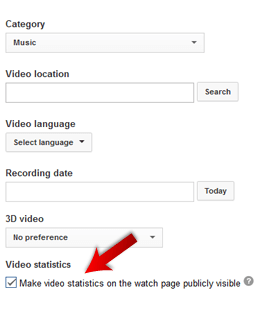 | Under the Advanced Settings go to Category Section and under the Video Statistics check the "Make Video Statistics on the watch page Publicly Visible" checkbox. Click on the Blue "Save" button. |
Step 8. - Get One Social Media Interaction | |
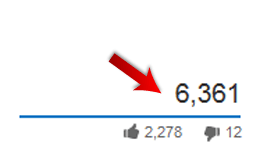 | For our system to work correctly you will need to have one Social Media Interaction on your YouTube Video (in this case one View, Like or Comment on your YouTube Video). |