 Login
Login
 Register
 Blog
Blog


Practical rules for everyday use
Like4Like Usage Guidelines
These guidelines turn our policies into a simple workflow: prepare an eligible public destination, complete tasks honestly, confirm only completed actions, and keep delivery within a pace you can monitor.
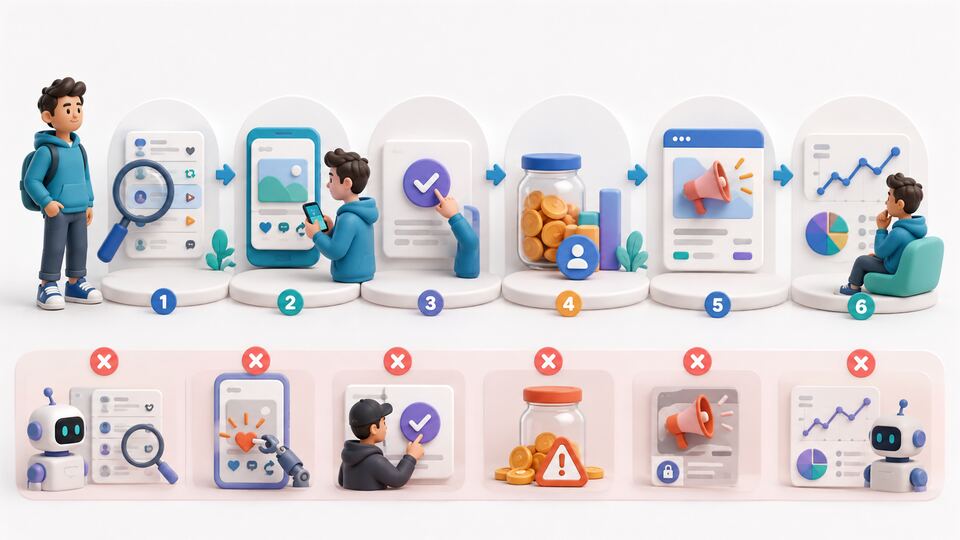
A responsible six-step workflow
- Prepare the destination. Use an eligible, public, working URL with content that accurately matches the campaign.
- Protect access. Never share a social-network password, recovery code, cookie, or authentication token.
- Complete tasks yourself. Open the destination, perform the requested action, and allow it to register.
- Confirm honestly. Confirm only after the action is complete; do not use scripts, bots, emulators, or false confirmations.
- Control the campaign. Set sensible daily and total limits, monitor quality, and pause when the destination or platform changes.
- Report clearly. Send the campaign URL, time, error message, and a safe screenshot—never secrets or passwords.
Keep expectations realistic
Availability and speed depend on active members, targeting, credit settings, destination quality, and third-party platform conditions. Counts and retention can change after audits or user decisions.
Know which document applies
This page explains practical use. Community Standards define acceptable conduct, while the Terms and Privacy Policy are the governing documents.
Guideline questions
When should I confirm a task?
Confirm only after you personally complete the requested action and it has had time to register.
Can I automate earning credits?
No. Automated actions, scripts, false confirmations, and attempts to manipulate the credit system are prohibited.
What should I include in a support report?
Include the affected URL or campaign identifier, approximate time, exact error, device or browser, and a safe screenshot. Do not include passwords or recovery codes.